

Apps
An app (the dashboard also calls it a service) is a container that Geass keeps running for you. You create it from a container image or from a GitHub repository, give it a port and a size, optionally a public domain, and Geass runs it as a Kubernetes Deployment behind a Service and, if you set a domain, an Ingress. If you want to run a small piece of code without building an image, see Functions.
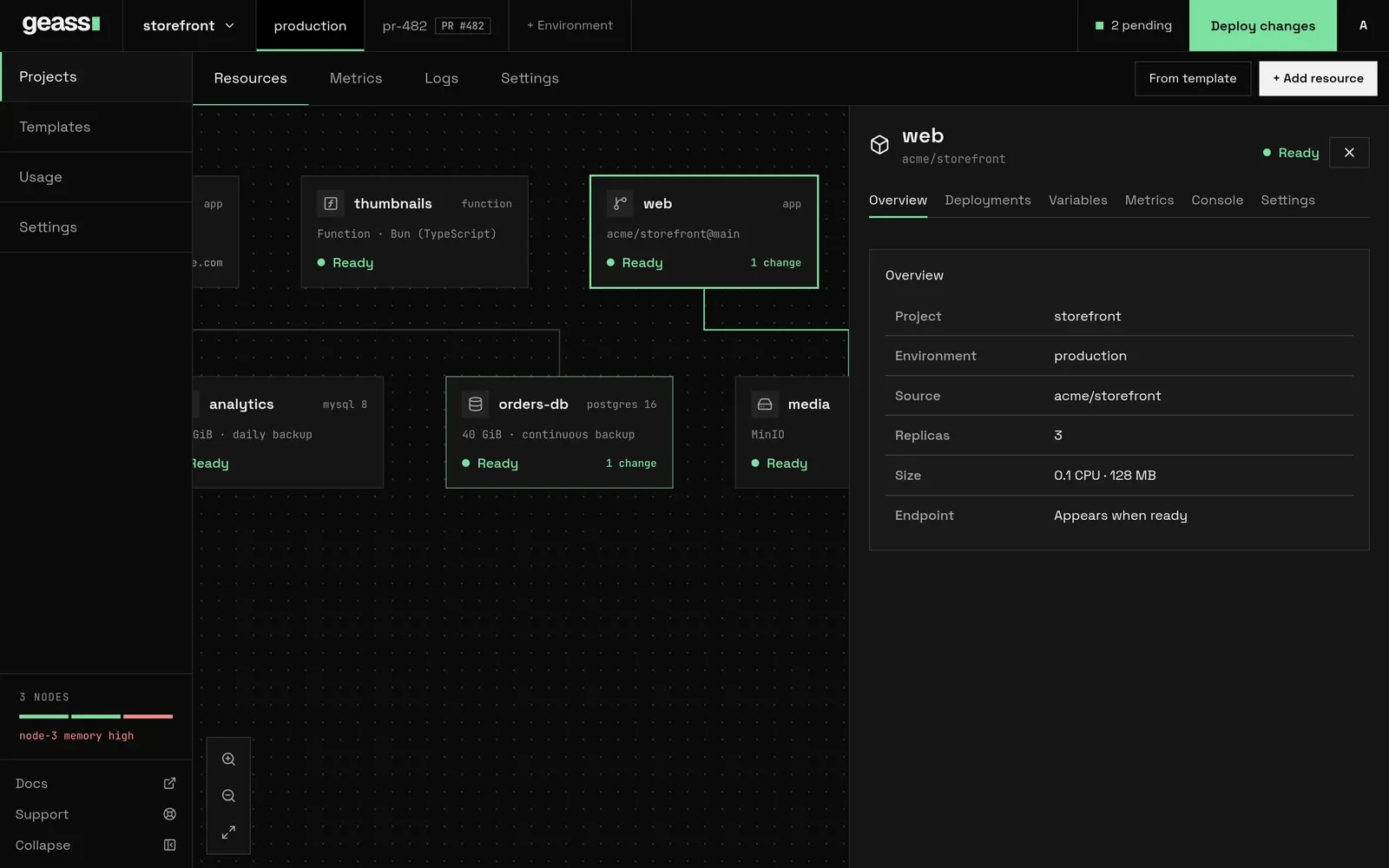 Screenshot with example data.
Before you start
Section titled “Before you start”- A project and an environment to put the service in. See Projects and environments.
- For a container image: the image reference, and your registry credentials if the image is private (see Pull a private image).
- For a GitHub repository: a connected GitHub App, a Dockerfile in the repository, and a container registry you control, because Geass builds the image and has to push it somewhere. See GitHub and builds.
- Free capacity in the cluster for the size you choose. See Usage and capacity.
Create a service from a container image
Section titled “Create a service from a container image”- Open the project, pick the environment tab, and choose + Add resource.
- Choose Docker Image, type the image reference (for example
ghcr.io/acme/storefront:1.4.0ornginx:alpine), and press Enter or choose Create. You can also paste a reference that contains/or:straight into the first search box and choose the Deploy image … row. - Geass saves the service as a draft and opens its Settings. A draft runs nothing.
- Set the Port under Networking to the port your container listens on. Add variables on the Variables tab. Add a domain if the service should be public.
- Choose Deploy changes in the top bar. The status goes from Draft to Setting up to Ready.
An image reference may contain letters, digits and . _ / @ : -, must start with a letter or digit, and cannot contain
spaces. Docker Hub short names such as nginx:alpine work. Geass does not look the image up when you save it. A wrong
name shows up when you deploy, as a pod that cannot pull the image.
Pin a tag or a digest (:1.4.0, @sha256:…) rather than latest. Geass leaves Kubernetes’s default pull policy in
place: a pod pulls latest every time it starts, but reuses an image that is already on the node for any other tag, so a
moving tag such as :stable can keep running an old image. A pinned tag also makes the
deployment history mean something.
Create a service from a GitHub repository
Section titled “Create a service from a GitHub repository”- Choose + Add resource → GitHub Repository.
- If the project is not linked to GitHub yet, choose Connect GitHub and follow GitHub’s pages. If the cluster has no GitHub App yet, the box says so and links to Settings → Connectors.
- Pick a repository from the list, or paste
acme/storefrontor a GitHub link into the first search box. - Geass saves a draft that follows the repository’s default branch (the branch in a
/tree/link, ormainwhen you pasted a bare name), and opens its Settings. Check Branch and Dockerfile path under Source and Build. - Choose Deploy changes. Geass builds the image, pushes it to your registry, and runs it.
How the build works, where the image goes, what to do when it fails and how to build a newer commit is in GitHub and builds. A push to the branch starts a build.
The service panel
Section titled “The service panel”Click a service on the canvas to open its panel. The title is the display name: click it, type a new name and press
Enter (Escape cancels). The name is only a label. The service ID, such as amber-fern, is generated, never changes,
and is what you use in kubectl and in the private address.
The header shows the status and, when it applies, Redeploy or Retry. The tabs are:
| Tab | What it shows |
|---|---|
| Overview | Project, environment, source, replicas (with the autoscaling ceiling), size and endpoint. |
| Deployments | The live deployment and the history, with logs. |
| Code | Functions only: the code, its mode and its schedules. See Functions. |
| Variables | Variables, secrets, references and shared variables. See Environment variables and secrets. |
| Metrics | Charts for the service. See Observability. |
| Console | A terminal inside a running pod. Admins only. See Observability. |
| Settings | Everything below. |
Statuses
Section titled “Statuses”| Status | Meaning |
|---|---|
| Draft | The service was never deployed. Nothing runs. |
| Setting up | A deploy, a build or a rollout is in progress, or the pods are starting. A sleeping service that a request woke shows this until its copy is up. |
| Ready | The Deployment has all the replicas you asked for available. A service with 0 replicas counts as ready, and so does a service that is asleep because it sleeps when idle. |
| Unavailable | Geass cannot proceed until something outside the service changes, such as free capacity or platform configuration, or a container is stuck (CrashLoopBackOff, ImagePullBackOff and similar). |
| Failed | The rollout failed, or provisioning failed after repeated errors. Retry appears when provisioning gave up. |
| Deleting | The service is being removed. |
Settings
Section titled “Settings”Open Settings on the service panel. It has a filter box at the top (press / to focus it) and a list of sections on
the right. Each section has its own Save changes button. After you save, a toast tells you what happened: “Saved.
Applied now”, “Saved. Deploy to apply them”, “Saved. Some changes are live; deploy to apply the rest”, or “Nothing to
save”.
Sections marked Applies instantly take effect on save even for a deployed service. Everything else becomes a pending change until you choose Deploy changes. See Pending changes and Deploy changes.
Source
Section titled “Source”What the service runs. Only the block that matches how you created the service appears.
| Setting | Meaning | Default | Applies |
|---|---|---|---|
| Image | The container image reference. | What you entered. | On deploy |
| Repository | The GitHub repository, as owner/name. |
The repository you picked. | On deploy |
| Root directory | Intended as the directory to build from. The build does not use it today; see GitHub and builds. | Empty | On deploy |
| Branch | The branch the build clones. A new commit on it is not built automatically today; see Build a new commit. | The repository’s default branch | On deploy |
| Wait for CI | Start a build only when the commit’s GitHub checks have all succeeded. Needs the Checks permission on the GitHub App; see Wait for CI. | Off | On deploy |
| Runtime | Functions only: Bun (TypeScript), Node.js or Python. The code, the mode and the schedules are on the Code tab. | Bun (TypeScript) | On deploy |
Networking
Section titled “Networking”| Setting | Meaning | Default | Applies |
|---|---|---|---|
| Custom domain | The hostname that reaches the service, such as shop.example.com. Enter the name only, without https://. Leave it empty for no public address. |
None | Instantly |
| Port | The port the container listens on, 1 to 65535. | 8080 | On deploy |
| HTTPS | Serve the domain over TLS. Needs the letsencrypt-prod certificate issuer, which Geass creates when the cluster has an ACME email. See Domains and TLS. |
Off | Instantly |
| Verify DNS | Check that the hostname resolves each time Geass reconciles the service, and show the result under the URL. It never holds the service back from Ready, although the form text says “before reporting the domain as ready”. | Off | Instantly |
Under the fields, Public networking shows the URL (with a link) once the service is ready, and a line such as “Routed via
” or “Routed through the cluster ingress”. When Verify DNS is on and the name did not resolve, the line reads “DNS hostname is required”, whatever the cause. Private networking shows the address other services in the project can use,<service ID>.<namespace>.svc.cluster.local:<port>, with a copy button. It appears once the service has
been deployed.
How a domain reaches your service, how HTTPS works and how to fix DNS problems are in Domains and TLS.
Ports and protocol. A service has one port. The container port, the Kubernetes Service port and the Ingress
backend all use the Port value. There is no protocol setting: public traffic is HTTP or HTTPS through the cluster’s
Traefik ingress. Other services in the project can connect to the port with any TCP protocol over the private address,
but Geass does not publish raw TCP to the internet. Make the process listen on all interfaces (0.0.0.0), not only on
localhost.
| Setting | Meaning | Default | Applies |
|---|---|---|---|
| Replicas | How many copies run. The form takes 1 or more; the API accepts 0 to 1000. | 1 | Instantly |
| CPU and Memory | The size of each replica. | 0.1 CPU, 128 MB | On deploy |
| Run on | Only use nodes with the tags you tick. It appears only when nodes carry tags. See Scaling and placement. | None chosen | On deploy |
| Enable autoscaling | Add replicas when average CPU use goes above the target. | Off | Instantly |
| Scale up to | The most replicas autoscaling may run. | 3 | Instantly |
| CPU target % | The average CPU use that triggers scaling, 1 to 100. | 50 | Instantly |
| Sleep when idle | Stop the service when nobody is using it, and start it on the next request. It needs a public domain and the serverless add-on. Switching it on switches Enable autoscaling off, and the other way round. | Off | Instantly |
| Sleep after (minutes) | How long without a request before the service stops, 1 to 1440. | 5 | Instantly |
CPU sizes are 0.1, 0.25, 0.5, 1 and 2. Memory sizes are 128 MB, 256 MB, 512 MB, 1 GB, 2 GB and 4 GB. Geass sets both the request and the limit to the size you choose, so a replica cannot burst above it and the capacity is reserved. A replica that uses more memory than its limit is killed and restarted.
With autoscaling on, Replicas is the minimum. While a service sleeps when idle, Replicas does not apply: the scale-to-zero add-on decides how many copies run, from none up to 3 by default. If the service cannot sleep (no add-on, no public domain), the block says why and the service keeps running. See Sleep when idle.
The deploy check compares the estimate (size times replicas, or times the autoscaling ceiling) with the free capacity of the cluster. See Usage and capacity.
Only repository services have build settings. For a service that runs an image or a function, the section says there is nothing to build. The Builder block says Geass builds with Kaniko.
| Setting | Meaning | Default | Applies |
|---|---|---|---|
| Dockerfile path | The Dockerfile to build, relative to the root directory (the repository root when that is empty). | Dockerfile |
On deploy |
| Watch paths | Gitignore-style rules, one per line, that limit which pushes trigger a build; see GitHub and builds. | Empty | Instantly |
| Use build cache | Reuse image layers between builds. It is part of the build’s identity, so changing it starts a new build. | Off | On deploy |
Deploy
Section titled “Deploy”| Setting | Meaning | Default | Applies |
|---|---|---|---|
| Command | Replaces the image’s entrypoint. | The image default | On deploy |
| Arguments | Replaces the image’s default arguments. | The image default | On deploy |
| Working directory | The directory the process starts in. | The image default | On deploy |
| Path (healthcheck) | An HTTP path Geass calls on the service port to decide the pod is ready. Empty means no check. | None | On deploy |
| Policy (restart) | Fixed at Always. The field is read-only. | Always | |
| Enable metrics | Expose Prometheus metrics from /metrics on the service port. Needs the Prometheus Operator, which the monitoring add-on installs. |
Off | Instantly |
Command and arguments. Geass splits both fields on spaces and does not interpret quotes, so an argument that
contains a space cannot be written here. Set spec.build.command and spec.build.args in a manifest if you need that.
Healthcheck. The check is an HTTP GET on the service port with a 10 second period, a 2 second timeout and 3 failures allowed. While it fails, the pod receives no traffic and a rolling deploy waits. Choose a cheap path that returns a status below 400 once the service can take requests. Without a check, a pod is ready as soon as its container starts.
General and Danger
Section titled “General and Danger”General shows the project, the environment and the Service ID with a copy button. Danger deletes the service. See Delete a service.
Settings only available through the API
Section titled “Settings only available through the API”The dashboard has no form for these. Send them to POST /api/apps/{id}/update or put them in a manifest.
| Field | Meaning |
|---|---|
livenessPath and livenessPort, readinessPort, readinessPeriod, readinessTimeout, readinessFailureThreshold |
A liveness probe, and the details of the readiness probe. A liveness failure restarts the container. |
minReplicas |
The autoscaling floor, when it should differ from replicas. |
scaleToZeroMax |
The most copies a service that sleeps when idle may run when awake, 1 to 100. The dashboard sets only scaleToZero and idleSeconds. |
functionMode, functionTriggers |
A function’s mode and schedules. Also on the Code tab. See Functions. |
deploy=on |
Save and deploy in the same request. |
spec.ingress.rules (manifest) |
More than one host and path for the same service. |
spec.source.image.pullSecret (manifest) |
A registry pull secret. See Pull a private image. |
spec.configMapRefs, spec.secretRefs (manifest) |
Mount existing ConfigMaps and Secrets of the environment’s namespace. |
spec.build.registry (manifest) |
The registry a repository service builds into. See GitHub and builds. |
spec.logs.archiveStoreRef (manifest) |
An object store that keeps the log of each build, which Geass otherwise deletes with the build Job an hour after it ends. |
There is no persistent volume option for a service. The container filesystem is lost when a pod restarts, so keep state in a database or a bucket.
Pull a private image
Section titled “Pull a private image”The dashboard has no field for registry credentials, so a private image needs a pull secret, set in the resource. Create
the secret in the environment’s namespace, which exists once the project does, and name it in pullSecret:
kubectl -n proj-1a2b3c4d-production create secret docker-registry acme-registry \  --docker-server=ghcr.io --docker-username=acme-bot --docker-password="$GHCR_TOKEN"
kubectl -n geass-system patch geassapp amber-fern --type merge \  -p '{"spec":{"source":{"image":{"pullSecret":{"name":"acme-registry"}}}}}'
Then choose Redeploy on the service (or Deploy changes if it has pending changes), so Geass takes the new setting into its deployed copy. The pull secret applies to services that run an image. The image a repository build produces is pulled without one; see GitHub and builds.
Deployments, redeploy and rollback
Section titled “Deployments, redeploy and rollback”Deployments lists every deploy. The first card is the live one. History (n) below it lists earlier ones, newest
first, and Hide skipped removes skipped entries. Each row has a badge (ACTIVE, FAILED, SKIPPED or
REMOVED for an older deploy), a title such as Deploy ghcr.io/acme/storefront:1.4.0 or Deploy acme/storefront@main,
and when it ran. Geass keeps the 12 most recent deployments of a service.
Choose View logs, or click a row, to open the log panel. It has four tabs:
- Details: the outcome, any errors, and the provisioning messages.
- Build Logs: for a repository service, only for a deployment that has a build attached. It shows the build’s failure
reason, or the build’s name and phase. It does not show the Kaniko output; read that with
kubectl(see Build logs). - Deploy Logs: the last 400 lines of every running pod, for the active deployment only.
- Network Logs: not available yet. The tab says so.
Redeploy (in the header, when nothing is pending) restarts the pods with the saved settings. It does not rebuild a repository service: the same image runs again. To build a newer commit, see Build a new commit.
Rollback has no button. The API, the command line (geass rollback) and an agent (rollback_app) can go back to an earlier deploy of a service that runs an image:
# List the recorded deployments of a servicekubectl -n geass-system get geassdeployments -l geass.dev/app=amber-fern
curl -X POST https://geass.example.com/api/apps/amber-fern/rollback \  -H "Authorization: Bearer $GEASS_TOKEN" \  -H "Accept: application/json" \  -d revision=amber-fern-x7k2p
It sets the image back to the one recorded in that deployment, restores its replica count and redeploys. It does not restore variables or other settings. For a repository service it only restores the replica count and redeploys the current build, so to go back, revert the commit and then build it (see Build a new commit). A function cannot be rolled back (“functions cannot be rolled back; restore the earlier code and deploy again”).
Other actions without a button are scaling (POST /api/apps/{id}/scale with replicas) and retrying a failed provision
(POST /api/apps/{id}/retry-provision). A project token can call them for the services of its environment. See
Users and API tokens and the REST API.
POST /api/apps/{id}/build builds a repository service’s branch again, by putting its current build back to the start, and
POST /api/apps/{id}/build/cancel cancels that build while it is waiting or running. A project token can call both. See
Build a new commit.
From the command line or an agent
Section titled “From the command line or an agent”What you do in the dashboard is also a geass command and an MCP tool, and so are some things it has no button for. Both
use the same API as the dashboard, so drafts, pending changes and Deploy changes work the same way.
| To | Command | MCP tool |
|---|---|---|
| Create a draft from an image, a repository or a function | geass apps create web -p proj-1a2b3c4d -e production --image nginx:alpine --port 80 |
create_app (image or repository) |
| Deploy the pending changes, and wait | geass deploy web --wait |
deploy_app |
| Read a service’s state and replicas | geass status web |
app_status |
| Read its logs | geass logs web or geass logs web -f |
get_logs |
| List its deployments | geass apps deployments web |
app_deployments |
| Set a variable or a secret | geass env set web LOG_LEVEL=debug |
set_variable |
| Set the replicas, or sleep when idle | geass scale web 3, geass scale web --sleep-after 10m |
scale_app, set_sleep_when_idle |
| Go back to an earlier deploy | geass rollback web |
rollback_app |
| Schedule a function | geass functions triggers add report nightly "0 3 * * *" |
set_function_trigger |
See Command line, MCP server, the CLI reference and the MCP tools.
Delete a service
Section titled “Delete a service”- Open the service, then Settings → Danger (the section is named Delete service).
- Type the service ID (not the display name) in the box, choose Delete service, then Delete permanently.
You can also delete from the project’s Settings → Danger → Manage Services → Remove.
Deleting removes the Deployment, Service, Ingress and autoscaler, a function’s schedules, the service’s variables and secrets, its build records and its deployment history. It does not delete the image from your registry. Deletion is not reversible.
Manifest and API
Section titled “Manifest and API”You can create a service without the dashboard by writing a GeassApp. A service created this way has no draft step: it
runs as soon as spec.deploy.enabled is true, and later edits apply directly, with no pending changes list.
apiVersion: geass.geass.dev/v1alpha1kind: GeassAppmetadata: name: amber-fern namespace: geass-system annotations: geass.dev/display-name: storefrontspec: project: proj-1a2b3c4d environment: production source: image: image: ghcr.io/acme/storefront:1.4.0 port: 3000 replicas: 2 ingress: host: shop.example.com tlsEnabled: true resources: requests: { cpu: 250m, memory: 256Mi } limits: { cpu: 250m, memory: 256Mi } deploy: enabled: true readinessProbe: httpGet: { path: /healthz, port: 3000 } env: - name: LOG_LEVEL value: infokubectl apply -f storefront.yamlkubectl -n geass-system get geassapp amber-fernspec.project is the project’s ID, not its name: kubectl -n geass-system get geassprojects lists them. Without
spec.deploy.enabled: true the service stays a draft that the controller reports as “Service is configured and waiting
for deployment”.
Through the API, POST /api/apps/create with project, environment and image (or source=git with repository
and branch, or source=function with runtime) creates a draft and answers with its ID in name. Without name, the ID comes from the image or
repository name (storefront for ghcr.io/acme/storefront:1.4.0). Add draft=on to get a generated ID like the
dashboard does. You deploy it with POST /api/apps/{id}/deploy. Both calls take a form body and need a workspace admin
token. The versioned API takes the same fields as JSON (POST /api/v1/apps, PATCH /api/v1/apps/{name} and
POST /api/v1/apps/{name}/deploy). See the REST API.
What happens under the hood
Section titled “What happens under the hood”For a service amber-fern in project proj-1a2b3c4d, environment production:
| Object | Namespace | Name |
|---|---|---|
GeassApp, the desired state |
geass-system |
amber-fern |
GeassDeployment, one per deploy, plus amber-fern-active |
geass-system |
amber-fern-<suffix> |
GeassBuild and its Job, repository services only |
geass-system |
amber-fern-build-<hash>, …-kaniko |
| Secret with the service’s secret values | geass-system |
amber-fern-secrets |
Deployment, one container named app |
proj-1a2b3c4d-production |
amber-fern |
Service on port http |
proj-1a2b3c4d-production |
amber-fern |
| Ingress, when a domain is set | proj-1a2b3c4d-production |
amber-fern |
| ConfigMap and Secret holding variables | proj-1a2b3c4d-production |
amber-fern-config, amber-fern-secret |
| HorizontalPodAutoscaler, when autoscaling is on | proj-1a2b3c4d-production |
amber-fern |
| ServiceMonitor, when metrics are on | proj-1a2b3c4d-production |
amber-fern-metrics |
| Service and HTTPScaledObject, when the service sleeps when idle | proj-1a2b3c4d-production |
amber-fern-wake, amber-fern |
| CronJob per schedule, and Secret with its token, for a function | proj-1a2b3c4d-production |
amber-fern-<schedule>-<hash>, amber-fern-trigger |
kubectl -n geass-system get geassapp amber-fern -o yamlkubectl -n proj-1a2b3c4d-production get deploy,pods,svc,ingress -l app.kubernetes.io/name=amber-fernkubectl -n proj-1a2b3c4d-production describe deploy amber-fernkubectl -n proj-1a2b3c4d-production logs -l app.kubernetes.io/name=amber-fern -c app --tail=100The status of the Ready condition on the GeassApp carries the message the dashboard summarizes. A service
that fails repeatedly (five consecutive errors or three minutes) is marked ProvisionFailed and stops retrying until you
choose Retry or save a change. See GeassApp for every message.
Troubleshooting
Section titled “Troubleshooting”The service stays a Draft after I saved. Saving does not deploy a draft. Choose Deploy changes in the top bar.
It stays in Setting up. Open Deployments → View logs. For a repository service the message is “Git source
is waiting for a successful build”: see GitHub and builds. Otherwise run kubectl -n <namespace> get pods and
describe the pod. A pod that is Pending usually has nowhere to run; see Usage and capacity.
The status is Unavailable and the condition says The service cannot start: app is ImagePullBackOff. The same message
appears for ErrImagePull, InvalidImageName, CrashLoopBackOff, CreateContainerConfigError and
CreateContainerError. Geass reads it from the pod. If the container keeps failing, the status becomes Failed after
five failed checks or three minutes, and Retry appears. See GeassApp.
Pods show ErrImagePull or ImagePullBackOff. The image name or tag is wrong, or the image is private. Check the
name in Source. For a private image, set a pull secret.
Pods show CrashLoopBackOff. The process exits. Read Deploy Logs or kubectl logs --previous. Common causes
are a missing variable (see the Variables tab and remember variables only apply after a deploy), a wrong
Command, or a process that listens on a different port than Port.
The pod runs but the domain returns 502, 503 or “no available server”. Either Port does not match the port
the process listens on, the process listens only on localhost, or the healthcheck fails so the pod receives no
traffic. Check kubectl -n <namespace> get endpoints amber-fern: an empty list means no ready pod.
The domain returns 404 page not found. Traefik has no route for the hostname. The service may not be deployed
yet (the Ingress is created on deploy), the Custom domain may contain more than the hostname, or the request
reached a different server than the one running Geass. See Domains and TLS.
Deploy changes fails with “This service needs about … CPU and … memory”. The cluster does not have that much free. Choose a smaller size, lower the replica count or autoscaling ceiling, or add a node.
The status says “Provisioning failed after repeated errors” and shows Retry. Geass gave up after repeated errors. Read the error in Deployments → View logs → Details, fix the cause, then choose Retry.
Enabling metrics fails with “metrics are enabled but Prometheus Operator is not installed in this cluster”. The
cluster has no ServiceMonitor kind. Turn on the monitoring add-on or turn metrics off.
A variable I added is not in the container. Variable changes wait for a deploy. See Environment variables and secrets.
My change to Replicas or the domain took effect but the rest did not. Replicas, autoscaling, sleep when idle, the domain, HTTPS, DNS check, metrics and watch paths apply instantly. The rest waits for Deploy changes.
The service has no pods and the status is Ready. It is asleep: Sleep when idle is on and nobody has asked for it for the idle time. The next request to its public domain starts it. See Sleep when idle.